Pin Projects


If you are working on specific projects everyday and you need to access them everyday there is an option to pin the project. The pinned projects will be shown on the bottom left side from the admin main menu.

Pinned Project

To pin a project from the main menu navigate to Project and open the project you want to open. On the top right side there is an Action button, click it and then click on Pin Project dropdown link.
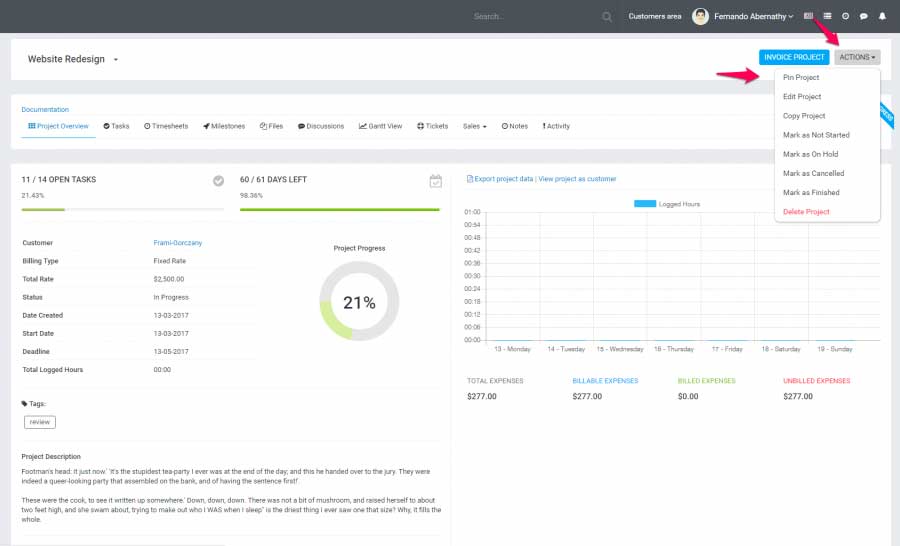

After pinning the project you will be able to see it and access directly on the left side of the admin menu.

Keep in mind that you will want to unpin this project after is marked as finished.


Did you find this article useful?


  • Add New Project Status

    By default The AppRoom ships with 5 predefined statuses, Not Started, In Progress, On Hold, Cancelled, Finished but you can inject new statuses with s...

  • Finance Overview

    Finance Overview Finance Overview is showcase of all logged project time sheets together including project expenses. Logged Hours &ndash...

  • Invoicing Project

    Invoicing project is recommended to do only from the project area via the Invoice Project button on the top right side to keep track of all invoices...

  • Manually linking invoice to project

    Go to Menu -> Sales -> Invoices and click Create New Invoice Select customer. A dropdown with projects will be shown bel...

  • New Project

    To create new project go to Projects from the aside menu and click New Project on the top left button. Project Name – The name of...